



Free Quote
Qunda Digital Thermostat for Central Air Conditioner QD-HVAC23 - SYSTO
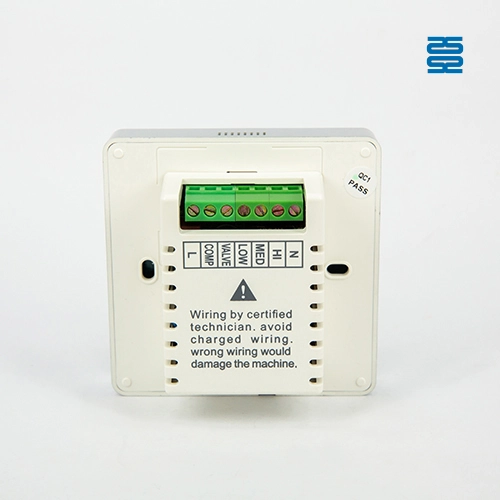
The Back of Qunda Digital Thermostat for Central Air Conditioner QD-HVAC23 - SYSTO
Qunda Digital Thermostat for Central Air Conditioner QD-HVAC23 - SYSTO
The Back of Qunda Digital Thermostat for Central Air Conditioner QD-HVAC23 - SYSTO

QD-HVAC23 Qunda Touch-Screen Thermostat for Air Conditioner

The screen is PMMA 3D mirror design, Switch power AC85-260V
Discover the SYSTO QD-HVAC23 Qunda Touch-Screen Thermostat, designed for precise air conditioner control. As a leading air conditioner thermostat manufacturer, SYSTO ensures durability and user-friendly operation with its advanced Qunda Thermostat technology. Optimize comfort today.
Dimension
86mm x 86mm x 16mm
Working humidity
5-95%RH
Supply voltage
AC85 to 260V, 50/60Hz
Temperature setting range
5℃ to 35℃
Temperature displaying range
0℃ to 50℃
Temperature control precision
± 1°C

Specifications

Temperature control precision Temperature displaying range Temperature setting range Supply voltage Operating ambient.
±1°C 0℃ to 50℃ 5℃ to 35℃ AC85 to 260V, 50/60Hz 0℃ to 45℃)
Working humidity Dimension Color    
5-95%RH 86mm x 86mm x 16mm White    

Features

◼01
Switch power AC85-260V
◼02
Full Power key with breathing light and whole
◼03
Touching screen
◼04
The screen is made from PMMA
◼05
The sunk power key with good touch feeling
◼06
With white backlight and automatic
Qunda Digital Thermostat for Central Air Conditioner QD-HVAC23 - SYSTO

Customization Options

• Temperature Range Adjustments: Can be set to meet specific operational requirements.
• Display Customization: Choose from various LCD display options (appearance, size, color, etc.).
• Additional Features: Remote control options available for added flexibility in operation. 
• Logo Customization: Silk printing, laser engraving, or mold-engraved logo.
• Packaging Customization: Box design, labels, barcodes, and stickers.
FAQs - SYSTO

Frequently Asked Questions

Find answers to frequently asked questions quickly. If you have any further questions, feel free to contact us.

More Answers
QD-HVAC20
How do I set the timer for my QD-HVAC20 thermostat?

Press the "TIMER" key on the thermostat to activate the timer function. You can then set the desired on/off times using the up/down arrows.

What do I do if the thermostat is not responding?

Ensure the thermostat is correctly installed and powered. If issues persist, check the wiring or consult the troubleshooting section in the manual.

How do I set the temperature on the QD-HVAC20 thermostat?

Press the “▲” or “▼” key to adjust the temperature to your desired setting. The LCD display will immediately show the updated temperature value.

How do I switch between cooling and heating modes?

Simply press the "MODE" key on the keypad to toggle between cooling and heating modes.

Tags

Get a Free Quote

If you have any comments or good suggestions, please leave us a message, later our professional staff will contact you as soon as possible.

Name must not exceed 100 characters.
Invalid email format or length exceeds 100 characters. Please re-enter.
Please enter a valid phone number!
Company Name must not exceed 150 characters.
Content must not exceed 3000 characters.

You May Also Like

Qunda Touch-Screen
Programmable Thermostat QD-HV123CW - SYSTO

QD-HV123CW Qunda Touch-Screen Wifi Programmable Thermostat for Air Conditioner

QD-HV123CW Qunda Touch-Screen Wifi Programmable Thermostat for Air Conditioner
The front of QD-HVAC20 Digital Thermostat for Central Air Conditioner - SYSTO
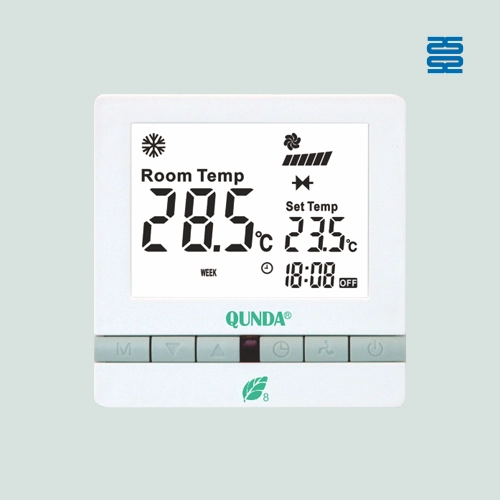
QD-HVAC20 Digital Thermostat for Central Air Conditioner

QD-HVAC20 Digital Thermostat for Central Air Conditioner
Qunda Digital Thermostat for Central Air Conditioner QD-HVAC08E - SYSTO

QD-HVAC08E Qunda Digital Thermostat for Central Air Conditioner

QD-HVAC08E Qunda Digital Thermostat for Central Air Conditioner
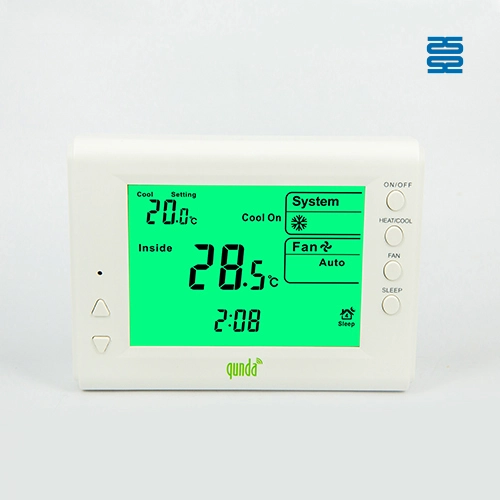
Qunda Digital Thermostat for Central Air Conditioner QD-HVAC09 - SYSTO

QD-HVAC09E Qunda Digital Thermostat for Central Air Conditioner

QD-HVAC09E Qunda Digital Thermostat for Central Air Conditioner
Contact customer service
×

Get Expert Advice

Have questions about our remote control solutions? Our team is ready to help you find the perfect product for your needs.

Name must not exceed 100 characters.
Invalid email format or length exceeds 100 characters. Please re-enter.
Please enter a valid phone number!
Company Name must not exceed 150 characters.
Content must not exceed 3000 characters.
×

Request More Information

Interested in our products? Reach out for more details on how our remote control solutions can meet your needs. We're here to help!

Name must not exceed 100 characters.
Invalid email format or length exceeds 100 characters. Please re-enter.
Please enter a valid phone number!
Company Name must not exceed 150 characters.
Content must not exceed 3000 characters.
×

Get a Personalized Quote

Ready to move forward? Provide your details, and we’ll send you a customized quote for your specific requirements.

Name must not exceed 100 characters.
Invalid email format or length exceeds 100 characters. Please re-enter.
Please enter a valid phone number!
Company Name must not exceed 150 characters.
Content must not exceed 3000 characters.
×

Customize My Remote Control Solution

Need something unique? Let us know your specifications, and we’ll work with you to create the perfect custom remote control solution.

Name must not exceed 100 characters.
Invalid email format or length exceeds 100 characters. Please re-enter.
Please enter a valid phone number!
Company Name must not exceed 150 characters.
Content must not exceed 3000 characters.
×

Get Our Product Catalog

Download our complete product catalog now to explore our solutions and help you make the best choice.

Name must not exceed 100 characters.
Invalid email format or length exceeds 100 characters. Please re-enter.
Please enter a valid phone number!
Company Name must not exceed 150 characters.
Content must not exceed 3000 characters.
